

 Loading...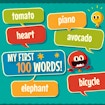









My First 100 Words: learn vocabulary through pictures and sound
My First 100 Words turns language practice into an interactive vocabulary game. The opening uses emojis to represent everyday words, places the written vocabulary beside them, and adds an audio clip for pronunciation. The player then hears a request and selects the matching emojis in the correct order. This combination gives the activity three helpful bridges: the image suggests meaning, the written word confirms the spelling, and the sound connects the lesson to real pronunciation. It is designed to be approachable for children while remaining useful for adults who want a gentle way to review basic vocabulary.
The game supports English, Spanish, French, and Norwegian, and the published description presents 31 levels that introduce new vocabulary and gradually become more challenging. It is a portrait-oriented HTML5/JavaScript title released on October 26, 2022, with a community rating of 9.4. The high rating reflects the community record, while the practical strength of the game is its clear learning loop. A player can see, hear, and select the words instead of studying a list without interaction.
Choose a language and listen first
Begin by selecting the language you want to practise and letting the first examples play before rushing to answer. Look at the emoji, read the written label, and listen to the audio clip. The three signals reinforce each other, but they do not always need to be processed at the same speed. A learner may recognise the picture immediately and use the sound to confirm the pronunciation. Another may read the word first and then connect it with the image. My First 100 Words leaves room for both approaches.
On desktop, use the mouse to select the emojis in the requested order. On mobile, tap the emojis with your finger in that same sequence. Make the choices deliberately and watch for the game’s response after each selection. If the spoken request names several items, do not rely on the position of the emojis. Read or listen to the instruction, find the matching pictures, and then select them one by one. This turns the answer into a small act of recall rather than a random search.
The written vocabulary is useful even when the picture feels obvious. It lets the player notice spelling patterns and compare familiar words across languages. When moving from English to Spanish, French, or Norwegian, look for the way the same idea is represented differently. The purpose is not to translate every sentence in a grammar lesson. It is to build a connection between the sound, the written form, and the visual meaning. Repeating that connection helps new words feel easier to recognise later.
Use the levels as short lessons
With 31 levels, the game is better approached as a sequence of small lessons than as one long test. Finish a level, note which words caused hesitation, and carry that observation into the next round. If the game introduces harder combinations, slow down and listen again instead of guessing from the first emoji you notice. A short pause can protect both accuracy and confidence. The goal is to remember the vocabulary, not merely to reach the next screen as quickly as possible.
When an answer is wrong, use it as a study cue. Check the selected picture against the written word and the audio. Ask whether the mistake came from confusing two similar images, forgetting the order, or hearing a word that was not yet familiar. Each cause suggests a different improvement. Look more carefully at the image for a visual confusion, repeat the request for an order problem, or listen again when pronunciation is the obstacle.
Parents and teachers can make the activity more conversational by asking the learner to say the word after selecting it. The game already supplies an audio model, so repeating the sound gives the player an active role. Adults studying a language can do the same and add a personal example, such as naming an object in the room. These small extensions keep the browser exercise connected to real memory instead of limiting it to the moment of the click.
Make progress visible
A good vocabulary session does not require completing many levels. Choose a language, practise a small group of words, and return later to see which ones now feel immediate. The 31-level structure makes progress easy to divide into manageable visits. A learner can focus on accuracy first, then work on speed once the sound and meaning are secure. That order avoids turning a pronunciation or recognition exercise into a stressful race.
The portrait layout is comfortable on a phone or tablet because the emoji choices remain close to the spoken task. On desktop, the mouse offers precise selection when several pictures are visible. In either setting, keep the screen clear and allow the audio to finish before answering. Listening is part of the lesson, not a decoration around the images. My First 100 Words works when the player uses all three sources of information together.
My First 100 Words is a friendly language-learning game with a clear educational purpose. Select English, Spanish, French, or Norwegian, study the emoji and written vocabulary, listen to the pronunciation, and answer by choosing the pictures in order. The 31 levels give the practice a gentle sense of progression, while the mouse and touch controls keep the activity accessible. For a learner who wants a visual, audible, and interactive way to review everyday words, each correct sequence turns a small browser action into a useful memory.
Practical notes for a return visit
Return visits are most useful when they have one language goal. Review a group of words in the same language, listen carefully to the audio, and speak the answer after selecting it. Switching languages can be enjoyable, but a focused session makes it easier to notice which vocabulary is becoming automatic and which words still need another look.
Use order as an extra memory exercise. First identify the emojis from their pictures, then repeat the task while paying attention to the spoken sequence. If the written labels are available, read them aloud before making the selection. The game then supports recognition, pronunciation, and recall at the same time. A mistake is not a setback; it is a clear signal about which part of the connection needs reinforcement.
The strongest feature of My First 100 Words is its immediacy. A picture, a word, and a sound appear together, then the player must act on that information. Keep that loop active by listening before clicking and by saying the selected word afterward. With 31 levels and four language options, the game can remain a short daily exercise that feels more like play than a vocabulary worksheet.
More Featured Games
Browse the Featured Games collection or continue with Robo-Butcher and Perimeter – Legate Edition.
Frequently Asked Questions
What is My First 100 Words about?
My First 100 Words turns language practice into an interactive vocabulary game. The opening uses emojis to represent everyday words, places the written vocabulary beside them, and adds an audio clip for pronunciation. The game frame above contains the current playable version and may change when the provider updates it.
How do you control My First 100 Words?
On desktop, use the mouse to select the emojis in the requested order. On mobile, tap the emojis with your finger in that same sequence. Make the choices deliberately and watch for the game’s response after each selection. Use the inputs shown by the live game, because controls can vary by device and provider version.
Does My First 100 Words work on mobile?
If the current provider build exposes touch support, it can be tried in a mobile browser. Otherwise use a desktop browser and the controls shown in the frame; performance and orientation can vary by device.