
Orbitarium: A 3D Gravity Sandbox | Solar Smash
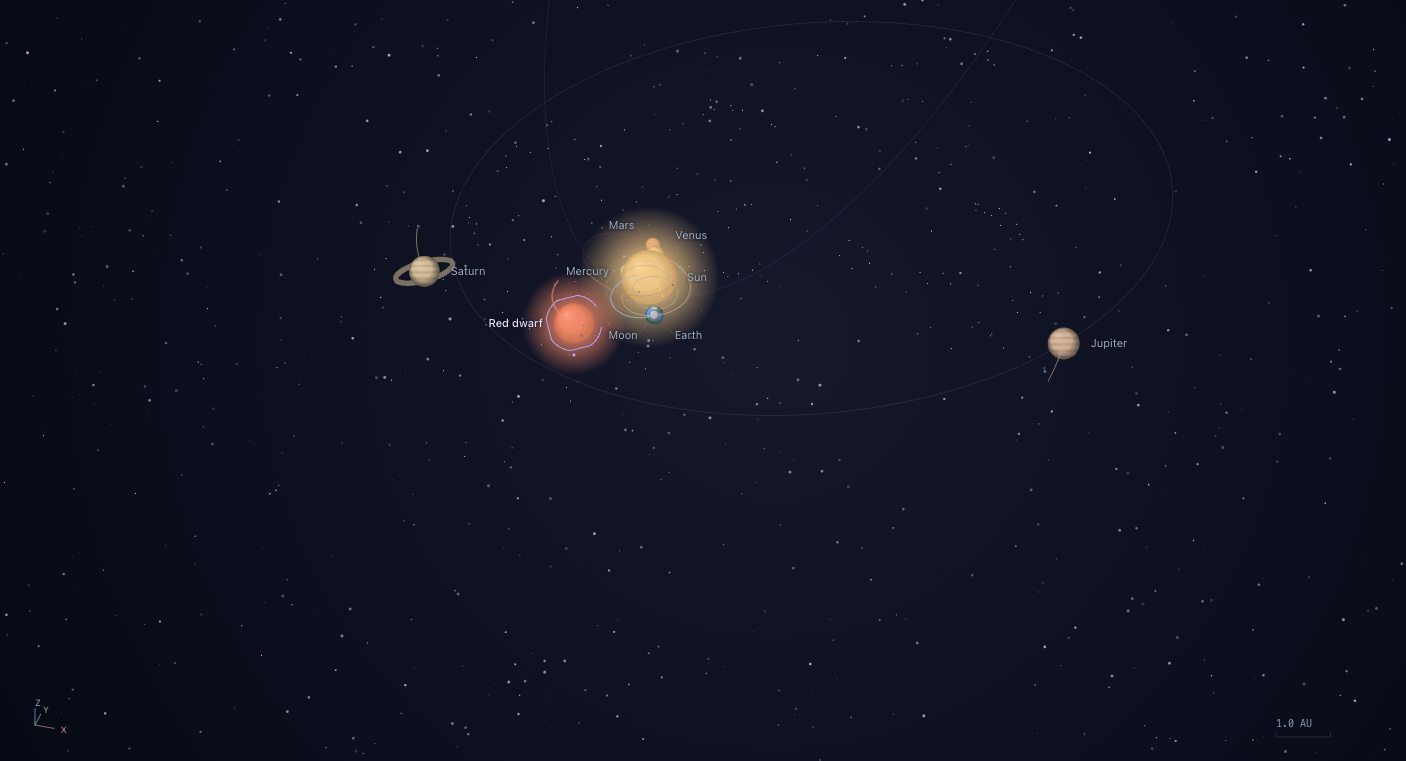
Orbitarium is a browser-based universe laboratory for building and observing a moving system of celestial bodies. Add objects, set their starting orbits, and watch gravity change the scene over time. It is a different kind of experience from a planet-destruction game: the focus here is editing a simulation rather than firing weapons at a world.
What is Orbitarium?
Orbitarium presents a live solar-system scenario with an editable object list and a three-dimensional viewing area. The public version identifies itself as Orbitarium 0.1. Its creator describes it as a gravity sandbox, and the source repository publishes the code under the MIT License. The simulation is an independent project and is not affiliated with the makers of Solar Smash.
There is no level path to follow in the interface I tested. Instead, you can choose a scenario, inspect a body, or add a new object and observe how the system changes. The app also exposes simulation controls such as pause, step, rewind, and time speed.
How to add an object
Open Add object to choose from templates including planets, moons, comets, asteroids, black holes and stars. The placement form lets you choose an existing primary body and set orbital details such as semi-major axis, eccentricity, inclination and phase. Orbitarium calculates an initial velocity from the selected primary body’s mass.
In my browser test, I selected the Red dwarf template and added it to the Solar System. The object appeared in the explorer and inspector, and the displayed body count changed from 190 to 191. That confirms the add action in this version; it is more useful than assuming a simulation is interactive merely because its scene moves.
Inspect and adjust the simulation
Select a body to open its inspector. The tested interface exposes editable physical values, including mass, radius, temperature, albedo, greenhouse offset and luminosity where those properties apply. The motion panel shows speed, distance to the primary body and the primary’s name. Orbit lines and trajectory trails can be shown or hidden, while the camera can be orbited, zoomed and focused on an object.
For a first experiment, leave the starting system intact, add one object, and watch the scene before changing another value. Then pause the simulation and adjust a single property. Keeping one change at a time makes it easier to see what the interface is showing without confusing several edits.
Orbitarium and Gravity Sandbox
Both titles invite you to experiment with gravity, but they are separate projects. Gravity Sandbox is a compact 2D body-placement experiment. Orbitarium presents a broader 3D system with an object inspector, orbital placement fields and additional scenario controls. Choose the one whose interface and level of detail suit the experiment you want to try.
Frequently asked questions
Can I play Orbitarium in a browser?
Yes. The author’s GitHub Pages build opened in desktop Chrome without a download or sign-in. The embedded game on this page also loaded and accepted the same add-object interaction. I have not tested mobile devices.
Can I change a planet’s properties?
The object inspector exposes several editable physical properties. The available fields depend on the selected object; the interface does not show every property for every template.
Is Orbitarium the same game as Solar Smash?
No. Orbitarium is an independent gravity-simulation project. It does not use Solar Smash’s weapon-based planet-destruction loop.
Final verdict
Orbitarium is worth a look if you want to create and inspect a changing celestial system rather than complete levels. Its strongest appeal is the combination of orbital setup, editable objects and a running gravity simulation. Use the controls gradually, and treat it as an interactive sandbox rather than a source of precise scientific predictions.
Creator and licence: Orbitarium’s source repository identifies the project as MIT-licensed. The live demo is provided by its author; Solar-Smash.io is an independent fan site.